Web Softphone • Browser calling
Your business phone — right in the browser.
TALKVOX includes a modern web softphone so your team can call from anywhere — without juggling random apps or losing visibility. Recents, voicemail, contacts, and presence in one place.
Web-first call controls
Dial, answer, hang up, mute, keypad — clean and fast.
Recents that actually help
Quick callback, missed calls, and call duration visibility.
Voicemail you can see
List + playback right inside the app (no hunting).
Presence + status
See who’s available so calls route smarter.
Get started
Get a quote for web calling + UCaaS.
Tell us how many users you have and how calls should route — we’ll recommend the cleanest setup.
(This opens the slider form so the page stays clean.)
Great fit for
- Remote + hybrid teams
- Sales teams that live in recents
- Service businesses that can’t miss calls
- Multi-location SMBs who want one system
Prefer email? Use the contact page and we’ll route you fast.
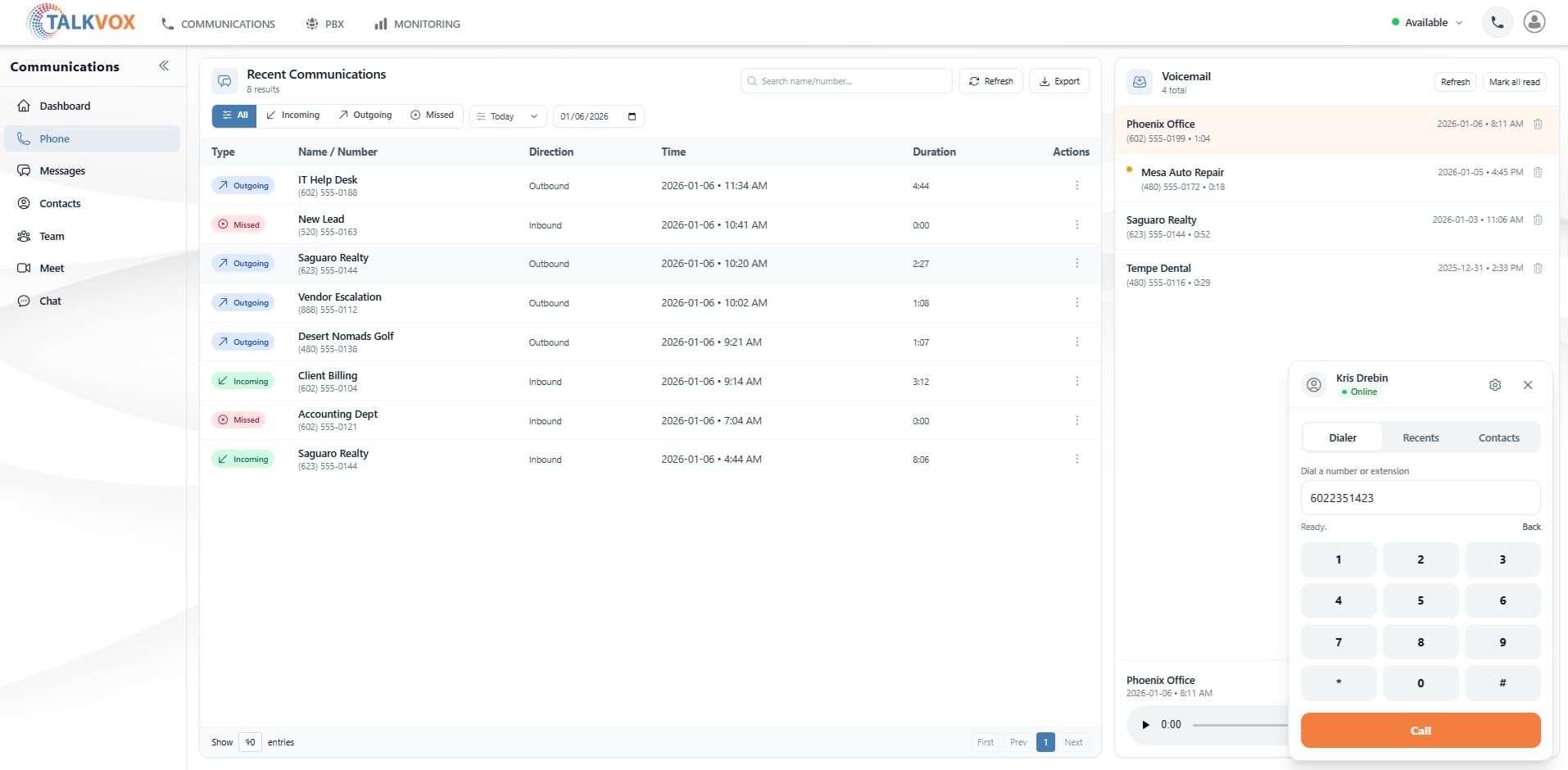
Recents + missed call visibility
Voicemail list + playback
Clean calling controls
Presence + status cues
Big, clean UI — built for teams who live on the phone.
Why it matters
Web calling that doesn’t feel like a compromise.
A lot of “softphones” are clunky bolt-ons. TALKVOX is built around the idea that your phone system should be visible, usable, and easy to manage — especially for teams that actually rely on calls to make money.
Fast to operate
Login, call, done. Fewer clicks, less friction, better day-to-day speed.
Accountable call visibility
Recents and call details make it obvious what happened—no guessing, no “it disappeared.”
Sales-friendly by default
Quick callback, clean call history, and tools that support outbound workflows.
Support that responds
If something is weird, you get help. Not a ticket black hole.
Works best with
Softphone + the stuff you actually need around it.
The softphone is the “front door.” The power is everything attached to it.
- Call queues + ring groups + after-hours routing
- Voicemail with in-app playback (and voicemail-to-email if you want)
- Contact directory + fast search
- Presence / status for smarter routing
- Reporting and call history (CDRs) for visibility and coaching
- Multi-device flexibility (web + desk phones + mobile)
Want the cleanest setup?
Tell us how calls flow today (and what’s annoying). We’ll recommend a setup that fixes it.
FAQ
Web softphone questions we get all the time
Quick answers here — if you want a recommendation, we’ll help you pick the cleanest setup.
+Is the web softphone included or an add-on?
+
Is the web softphone included or an add-on?
It’s built into TALKVOX. No extra app required — just log in and call.
+Can I use it for inbound and outbound calls?
+
Can I use it for inbound and outbound calls?
Yep. Make outbound calls, take inbound calls, and keep everything tied to your extension and call history.
+Do you support call history + reporting?
+
Do you support call history + reporting?
Yes. You’ll have recents (CDRs), visibility into missed calls, and a clean audit trail for what happened.
+Does voicemail work inside the browser too?
+
Does voicemail work inside the browser too?
Yes — voicemail list + playback in the app, plus your normal routing options like voicemail-to-email if you want it.
+Can my team use desk phones too?
+
Can my team use desk phones too?
Absolutely. Use the web softphone, desk phones, mobile — mix and match per user.
+Is it good for sales teams?
+
Is it good for sales teams?
That’s the point. Clean recents, quick callback, visibility, and tools that keep reps moving without fighting the UI.
Ready when you are
Calling in the browser should feel this clean.
If your current provider is clunky, confusing, or impossible to manage — you’ll feel the difference immediately.
- Instant calling from the web
- Recents + voicemail visibility
- Routing that makes sense
- Support that responds
What we’ll ask you
Just enough info to recommend the cleanest setup — no 45 minute interrogation.
How many users?
Porting or new numbers?
Queues / routing needs?
Any compliance needs?
Want the fastest path? Hit “Get started” and we’ll route it properly.